HotCakeSoftのヘッダー


C#中級 コーディング例
G1)滑らかサインウェーブ
G2)単一色ペイント
(スタック方式)
G3)ギザトゲ楕円
G4)ナミモク四角
G5)画像半透明化
G6)画像セピア化
G7)画像グレー化
G8)画像明度補正
G9)画像彩度補正
G10)画像コントラスト補正
G11)許容量付ペイント
C1)マウス移動可能パネル
この講座は中級者用です。
「using」「Form」等は、省略しています。


G1)滑らかサインウェーブ
G2)単一色ペイント
(スタック方式)
G3)ギザトゲ楕円
G4)ナミモク四角
G5)画像半透明化
G6)画像セピア化
G7)画像グレー化
G8)画像明度補正
G9)画像彩度補正
G10)画像コントラスト補正
G11)許容量付ペイント
C1)マウス移動可能パネル
この講座は中級者用です。
「using」「Form」等は、省略しています。
C#中級 コーディング例
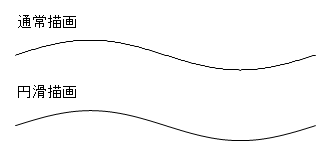
G1)滑らかサインウェーブ
「点の集まりの曲線」を普通に描くとギザギザに成るので、サイズを100倍して、
ページスケールを100分の1に設定すれば滑らか曲線で描けます。
public void DrawSinCurbe()
"
Point firstPoint = new Point(50, 50);//描き始め
Point secondPoint = new Point(350, firstPoint.Y);//描き終わり
bool smoothSet = false;//false:通常描画 true:円滑描画
Font font = new Font("Times New Roman", 10f);//フォント設定
Bitmap imgBitmap = new Bitmap(600, 600); //PictureBoxのサイズ
pictureBox.Image = imgBitmap;
Pen drawPen = new Pen(Color.Black, 0.1f);//描く線のPen設定
Brush brush = new SolidBrush(Color.Black);//文字色
Graphics grf = Graphics.FromImage(pictureBox.Image);
Bitmap sinBmp = SetSinCurve(drawPen,firstPoint,secondPoint,smoothSet);
grf.DrawString("通常描画", font, brush, 60f, 20f);
grf.DrawImage(sinBmp, 10, 10);
//円滑描画設定
firstPoint = new Point(50 * 100, 50 * 100);//各値を100倍
secondPoint = new Point(350 * 100, firstPoint.Y);//各値を100倍
smoothSet = true;
sinBmp = SetSinCurve(drawPen,firstPoint, secondPoint,smoothSet);
grf.DrawString("円滑描画", font, brush, 60f, 90f);
grf.DrawImage (sinBmp, 10, 80);
grf.Dispose();
"
//linePen:描く線の色
//startPoint:曲線の描き始め
//endPoint:曲線の描き終わり
//smooth://false:通常描画 true:円滑描画
public Bitmap SetSinCurve(Pen linePen, Point startPoint, Point endPoint,bool smooth)
"
double width = endPoint.X - startPoint.X;
double amplitude = width / 20; // 振幅
double resolution = 200; // 点の数
Point[] curvePoints = new Point[(int)resolution + 1];//サインカーブPoint配列
Bitmap bitmap = new Bitmap((int)(width * 2), (int)(amplitude * 5));
Graphics g = Graphics.FromImage(bitmap);
g.PageUnit = GraphicsUnit.Pixel;
if (smooth) { g.PageScale = 0.01f; }//円滑描画時1/100スケール
g.SmoothingMode = SmoothingMode.HighQuality;
//サインカーブ計算
for (int i = 0; i <= resolution; i++)
"
double t = (double)i / resolution;
double x = startPoint.X + t * width;
double y = startPoint.Y + Math.Sin(-t * 2 * Math.PI) * amplitude;
curvePoints[i] = new Point((int)x, (int)y);//配列に代入
"
g.DrawLines(linePen, curvePoints);
g.Dispose();
return bitmap;
"
"
Point firstPoint = new Point(50, 50);//描き始め
Point secondPoint = new Point(350, firstPoint.Y);//描き終わり
bool smoothSet = false;//false:通常描画 true:円滑描画
Font font = new Font("Times New Roman", 10f);//フォント設定
Bitmap imgBitmap = new Bitmap(600, 600); //PictureBoxのサイズ
pictureBox.Image = imgBitmap;
Pen drawPen = new Pen(Color.Black, 0.1f);//描く線のPen設定
Brush brush = new SolidBrush(Color.Black);//文字色
Graphics grf = Graphics.FromImage(pictureBox.Image);
Bitmap sinBmp = SetSinCurve(drawPen,firstPoint,secondPoint,smoothSet);
grf.DrawString("通常描画", font, brush, 60f, 20f);
grf.DrawImage(sinBmp, 10, 10);
//円滑描画設定
firstPoint = new Point(50 * 100, 50 * 100);//各値を100倍
secondPoint = new Point(350 * 100, firstPoint.Y);//各値を100倍
smoothSet = true;
sinBmp = SetSinCurve(drawPen,firstPoint, secondPoint,smoothSet);
grf.DrawString("円滑描画", font, brush, 60f, 90f);
grf.DrawImage (sinBmp, 10, 80);
grf.Dispose();
"
//linePen:描く線の色
//startPoint:曲線の描き始め
//endPoint:曲線の描き終わり
//smooth://false:通常描画 true:円滑描画
public Bitmap SetSinCurve(Pen linePen, Point startPoint, Point endPoint,bool smooth)
"
double width = endPoint.X - startPoint.X;
double amplitude = width / 20; // 振幅
double resolution = 200; // 点の数
Point[] curvePoints = new Point[(int)resolution + 1];//サインカーブPoint配列
Bitmap bitmap = new Bitmap((int)(width * 2), (int)(amplitude * 5));
Graphics g = Graphics.FromImage(bitmap);
g.PageUnit = GraphicsUnit.Pixel;
if (smooth) { g.PageScale = 0.01f; }//円滑描画時1/100スケール
g.SmoothingMode = SmoothingMode.HighQuality;
//サインカーブ計算
for (int i = 0; i <= resolution; i++)
"
double t = (double)i / resolution;
double x = startPoint.X + t * width;
double y = startPoint.Y + Math.Sin(-t * 2 * Math.PI) * amplitude;
curvePoints[i] = new Point((int)x, (int)y);//配列に代入
"
g.DrawLines(linePen, curvePoints);
g.Dispose();
return bitmap;
"
実行結果