HotCakeSoftのヘッダー

C#中級 コーディング例
G1)滑らかサインウェーブ
G2)単一色ペイント
(スタック方式)
G3)ギザトゲ楕円
G4)ナミモク四角
G5)画像半透明化
G6)画像セピア化
G7)画像グレー化
G8)画像明度補正
G9)画像彩度補正
G10)画像コントラスト補正
G11)許容量付ペイント
C1)マウス移動可能パネル
この講座は中級者用です。
「using」「Form」等は、省略しています。


G1)滑らかサインウェーブ
G2)単一色ペイント
(スタック方式)
G3)ギザトゲ楕円
G4)ナミモク四角
G5)画像半透明化
G6)画像セピア化
G7)画像グレー化
G8)画像明度補正
G9)画像彩度補正
G10)画像コントラスト補正
G11)許容量付ペイント
C1)マウス移動可能パネル
この講座は中級者用です。
「using」「Form」等は、省略しています。
C#中級 コーディング例
G11)許容量付ペイント
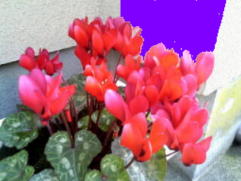
許容量(0~255)を設定して近似色をペイント
//bmp:対象イメージ画像
void FillApprox(Bitmap bmp, Point point, Color fill, int tolerance)
{
Color target = bmp.GetPixel(point.X, point.Y);//クリック位置の色取得
//塗る領域の設定
Point areaMinPoint = new Point(0,0);
Point areaMaxPoint = new Point(bmp.Width, bmp.Height);
int w = bmp.Width, h = bmp.Height;
bool[,] vis = new bool[w, h];
var st = new Stack<Point>();
st.Push(new Point(point.X, point.Y));
while (st.Count > 0)
{
var p = st.Pop();
int x = p.X, y = p.Y;
if (x < areaMinPoint.X || x >= areaMaxPoint.X || y < areaMinPoint.Y || y >= areaMaxPoint.Y) continue;
if (vis[x, y]) continue;
Color c = bmp.GetPixel(x, y);
if (!Similar(c, target, tolerance)) continue;
vis[x, y] = true;
bmp.SetPixel(x, y, fill);
st.Push(new Point(x + 1, y));
st.Push(new Point(x - 1, y));
st.Push(new Point(x, y + 1));
st.Push(new Point(x, y - 1));
}
pictureBox.Image = bmp;
}
bool Similar(Color a, Color b, int tol)
{
int dr = a.R - b.R;
int dg = a.G - b.G;
int db = a.B - b.B;
// RGB 各成分は 0~255
// 距離の二乗 <= tol^2 なら「近似色」
return dr * dr + dg * dg + db * db <= tol * tol;
}
void FillApprox(Bitmap bmp, Point point, Color fill, int tolerance)
{
Color target = bmp.GetPixel(point.X, point.Y);//クリック位置の色取得
//塗る領域の設定
Point areaMinPoint = new Point(0,0);
Point areaMaxPoint = new Point(bmp.Width, bmp.Height);
int w = bmp.Width, h = bmp.Height;
bool[,] vis = new bool[w, h];
var st = new Stack<Point>();
st.Push(new Point(point.X, point.Y));
while (st.Count > 0)
{
var p = st.Pop();
int x = p.X, y = p.Y;
if (x < areaMinPoint.X || x >= areaMaxPoint.X || y < areaMinPoint.Y || y >= areaMaxPoint.Y) continue;
if (vis[x, y]) continue;
Color c = bmp.GetPixel(x, y);
if (!Similar(c, target, tolerance)) continue;
vis[x, y] = true;
bmp.SetPixel(x, y, fill);
st.Push(new Point(x + 1, y));
st.Push(new Point(x - 1, y));
st.Push(new Point(x, y + 1));
st.Push(new Point(x, y - 1));
}
pictureBox.Image = bmp;
}
bool Similar(Color a, Color b, int tol)
{
int dr = a.R - b.R;
int dg = a.G - b.G;
int db = a.B - b.B;
// RGB 各成分は 0~255
// 距離の二乗 <= tol^2 なら「近似色」
return dr * dr + dg * dg + db * db <= tol * tol;
}
元画像 ペイントサンプル